Library
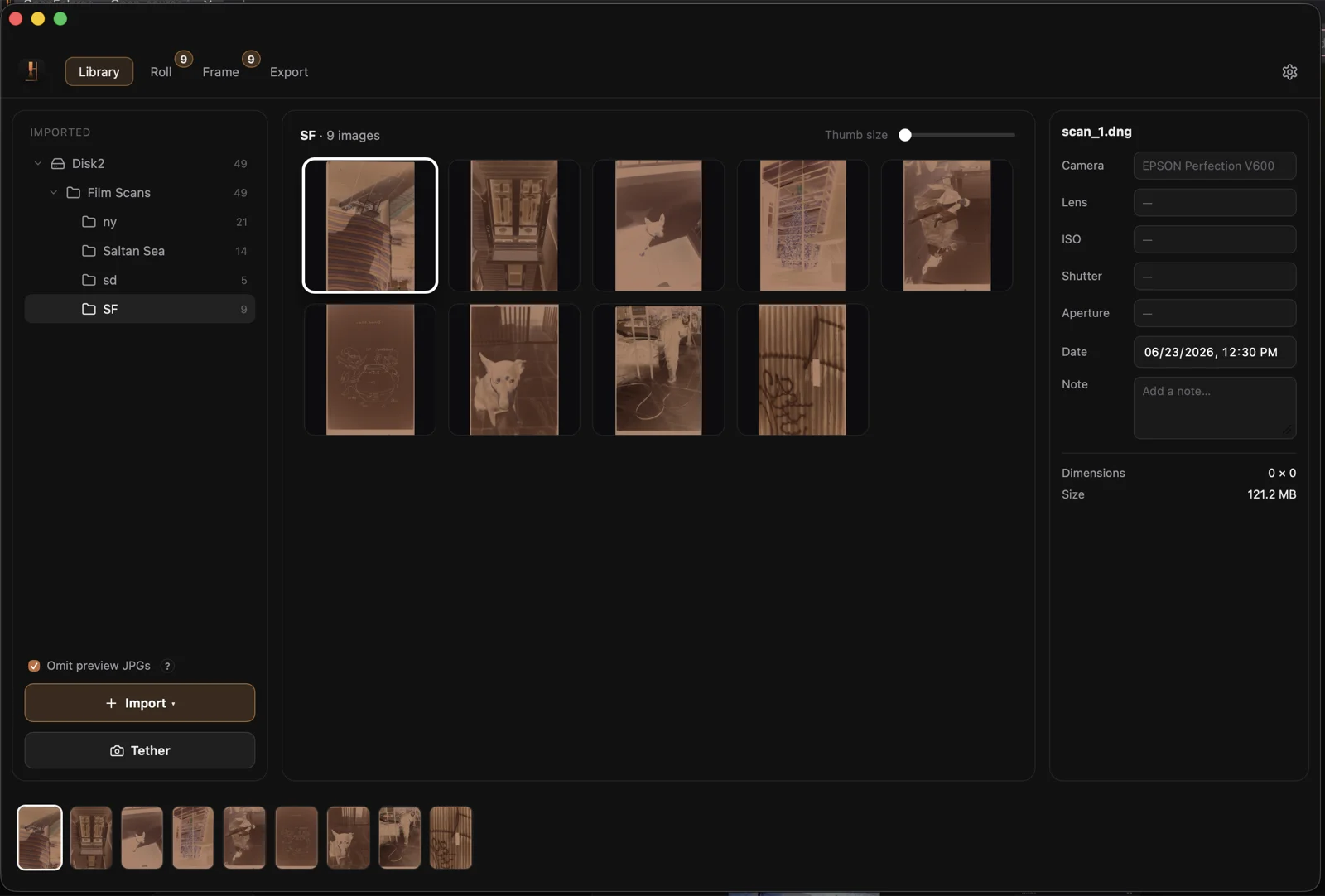
The Library is the entry point for every roll. It is where you import scans, navigate folders, and see the contact-sheet grid of thumbnails. This page covers how importing works, how the catalog organizes folders, and how thumbnails are generated, cached, and automatically refreshed when the render engine changes.
Import
Use the Import button in the left panel (labeled Import / Import Files… / Import Folder… in the menu) or drag and drop files directly onto the Library window. Both paths feed the same import pipeline.
OpenEnlarge accepts the following file types (case-insensitive): jpg, jpeg, png, dng, tif, tiff, raf, rw2, nef, arw, cr2, cr3, 3fr, orf, raw. Any file whose extension is not in this list is silently skipped. The list is defined in IMPORT_EXTENSIONS in workflow.ts.
The Omit preview JPGs checkbox (folderNav.omitPreviewJpgs) is on by default. When enabled, any JPEG (or PNG) that shares a folder and base name with a raw master in the same batch is dropped — only the master file is imported. Standalone JPEGs with no raw sibling are always kept. This prevents camera-generated preview files from cluttering the library alongside their raw originals. The preference persists across sessions.
Files are imported one by one and added to the catalog as they arrive. If nothing was selected before the import, the first imported file becomes the active image automatically.
Catalog and folders
OpenEnlarge does not copy or move your files. The catalog is a record of which files have been imported and what their develop state is — paths, thumbnails, edits, crops, and per-image flags all live in the catalog. The catalog is loaded on launch and written through continuously as you work; closing the app does not require a manual save.
Folders in the left panel correspond to the real directories on disk that your imported files live in. Clicking a folder sets the scope for the thumbnail grid on the right, showing only the images from that folder. The Imported heading at the top of the folder list groups all folders that contain at least one imported file. Within each folder the images appear in the order they were imported.
Switching folders does not unload or reload anything — the full catalog stays resident. The selected folder is remembered between sessions, so the library reopens on the same roll you were last working in.
Thumbnails and auto-refresh
Every developed image has a catalog thumbnail baked at develop time: a 320 px (long edge) rendered positive, stored with the image record. These thumbnails are what the grid displays at normal zoom — they load instantly from the catalog without re-decoding the raw file.
When you zoom in far enough that only one or two columns are visible, the grid switches to a higher-resolution render: a 1080 px (long edge) thumbnail computed on demand for each visible cell. The hi-res render uses your current edits — crop, dust removal, and develop parameters — so it matches what you see in Frame. Zooming back out returns to the cached 320 px catalog thumbnails.
Each catalog thumbnail carries the engine version that baked it (field thumb_stale on the image entry). When the render engine is updated — for example, the ENGINE_VERSION was bumped to 3 for the Faithful tone curve — all stored thumbnails from an earlier version are marked stale (thumb_stale: true). A stale thumbnail still displays, but it reflects the old look rather than the current engine.
OpenEnlarge refreshes stale thumbnails in two ways:
- Eager catalog sweep on app entry — when the Library loads,
sweepStale()runs once per session. It finds every developed image withthumb_stale: trueand re-bakes its thumbnail in the background using a bounded concurrency pool. By the time you scroll through the grid, the thumbnails already reflect the current engine. This is how anENGINE_VERSIONbump propagates to the whole catalog without any manual action. - Lazy per-cell refresh — as you scroll, each visible cell that is still stale (missed by the sweep, or newly stale) is re-baked individually via
regenStale()the first time it appears on screen. The new thumbnail is saved back to the catalog andthumb_staleis cleared, so it does not re-bake on subsequent views.
Both paths use the same render route: if the image has saved edits, the thumbnail is baked from those; if not (the image has never been opened in Frame), an auto-WB seed is measured first so the thumbnail matches the look the image would open with.
Under the hood
IMPORT_EXTENSIONS (defined in workflow.ts): ["jpg", "jpeg", "png", "dng", "tif", "tiff", "raf", "rw2", "nef", "arw", "cr2", "cr3", "3fr", "orf", "raw"]. The helper filterImportable(paths) lowercases the extension and tests it against this array; anything not in the list is dropped before the backend ever sees it.
omitPreviewSidecars: walks the importable list twice — first to build a set of "master" base-name keys (any non-preview extension in the same directory), then to filter out any jpg/jpeg/png whose same-folder-same-stem key is in that master set. Order-preserving and pure.
thumb_stale: the SQLite catalog stores thumb_version alongside each thumbnail. On load, thumb_stale is set to thumb_version != ENGINE_VERSION. ENGINE_VERSION is currently 3 (the Faithful look; see The tone curve). When saveThumbnail writes a new thumbnail it stamps the current ENGINE_VERSION, clearing the stale flag.
sweepStale: runs at grid mount time, gated by a module-level sweptStale boolean so it fires at most once per session. Uses a concurrency pool of 3 workers (POOL = 3) — enough to keep the backend busy without starving the UI thread. Each worker calls regenStale in a loop until the list is exhausted.
Hi-res boost: triggered when the effective column count (gridColumns()) drops to ≤ GRID_HIRES_MAX_COLS = 2. Each visible cell's hi-res url is cached in the component-local hiRes map keyed by the cell's static thumbnail url; if the static thumbnail changes (a regen or edit rebake), the key mismatch automatically invalidates the cached hi-res.